Workspace, theme and components
How the Rust Doppio workspace is composed: the PaneGrid layout, the Iced component kit, the visual tokens, and where the legacy C++ UI kit still applies.
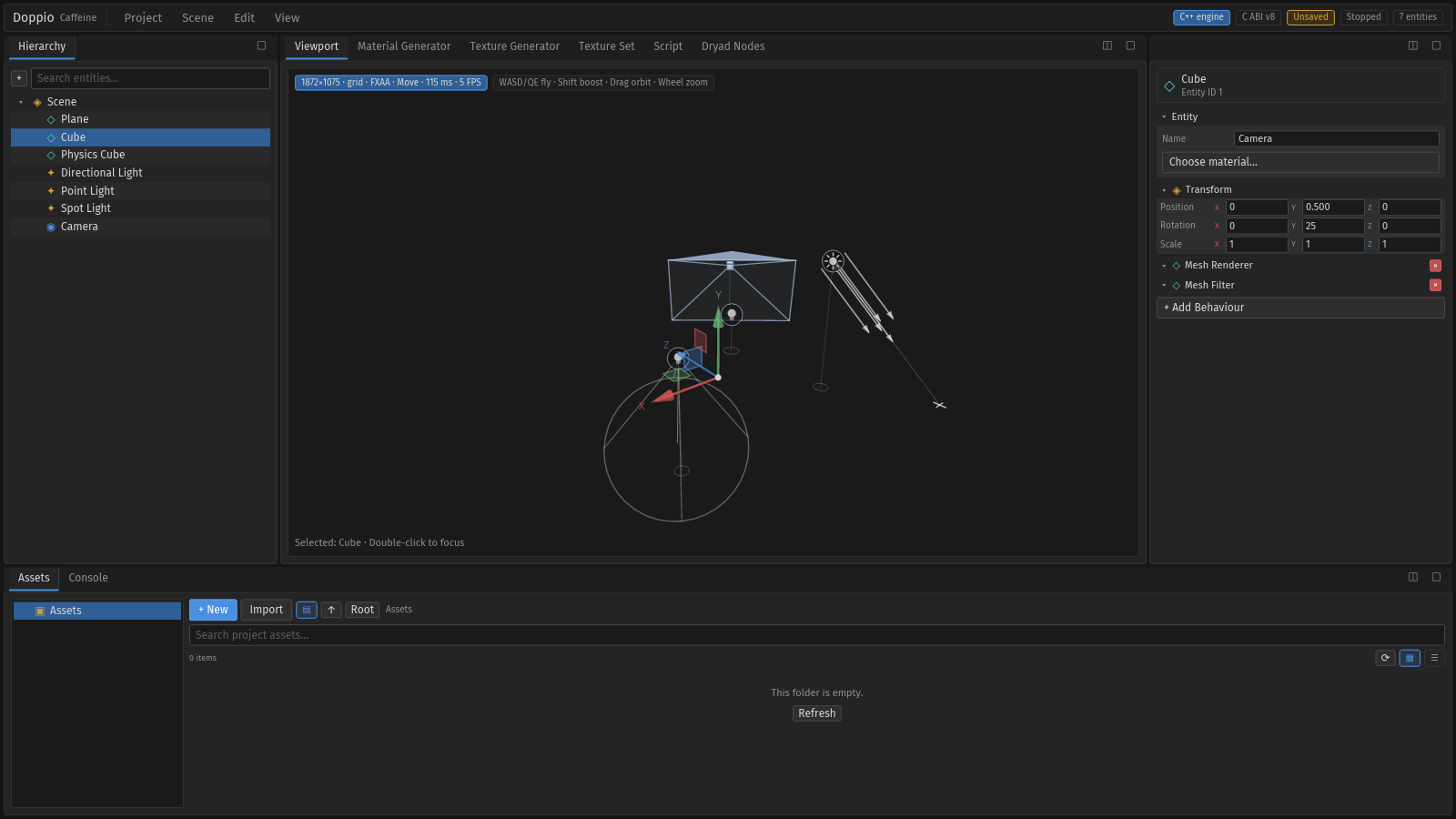
PaneGrid. Panels are pure view functions; interactive primitives live in uikit/components/.Two UI stacks, one product#
| Stack | Used by | Location |
|---|---|---|
| Rust / Iced | The active Doppio editor: docking, hierarchy, viewport, inspector, assets, console and generators. | doppio/crates/ui/ |
| C++ / ImGui UIKit | The standalone runtime, legacy plugins and archived C++ Doppio panels. | include/caffeine/ui/ |
The stacks share design vocabulary, not code. Do not describe the Rust editor as
using Caffeine::UIKit; the C++ kit is only loaded by the runtime and plugins.
Window → panel → component#
| Layer | Location | Rule |
|---|---|---|
| Window | windows/main.rs |
Owns App, messages, subscriptions and the PaneGrid. |
| Panel | uikit/panels/*.rs |
Pure view(...) -> Element; never calls raw text_input, checkbox, slider or button. |
| Component | uikit/components/*.rs |
Reusable primitives: buttons, fields, cards, tabs, menus, tree view, gizmo, viewport surface, node canvas. |
Panels compose components. scripts/check-rust-ui.sh rejects raw widgets in
uikit/panels/, which keeps focus, hover, disabled states and theme consistent.
Layout and docking#
The default PaneGrid is built from four regions:
- Hierarchy on the left.
- A centre group with Viewport, Material Generator, Texture Generator, Texture Set, Script and Dryad Nodes.
- A right group with Inspector, Material, Nature, Water and Terrain.
- A bottom group with Assets and Console.
Drag a tab by its header to show docking guides: the centre adds it to the target pane, an edge splits the pane. Pane buttons maximise and restore. Layout presets are in the View menu:
| Preset | Shortcut | Result |
|---|---|---|
| Default Layout | Ctrl+1 |
Hierarchy left, centre/right tools, Assets + Console bottom |
| Viewport Layout | Ctrl+2 |
Gives the viewport most of the window |
The Rust layout is session state; it is not written to workspace.json. The legacy
ImGui Caffeine::Workspace still persists ~/.config/caffeine/ui/workspace.json
for the runtime and plugin hosts.
Theme tokens#
doppio/crates/ui/src/uikit/theme.rs is the only source of colours, borders and
spacing. Panels must not hardcode colours.
| Token | Value | Used for |
|---|---|---|
BACKGROUND | #151515 | Window and viewport surround |
PANEL | #242424 | Pane bodies and cards |
PANEL_ALT | #2e2e2e | Alternating rows and inputs |
TOOLBAR | #1e1e1e | Tab bars, menus and status bar |
BORDER | #313131 | Panel and field outlines |
TEXT | #d6d6d6 | Primary labels and values |
TEXT_MUTED | #8e8e8e | Secondary labels and hints |
ACCENT | #4a8fe0 | Selection, focus and active tools |
DANGER | #c24f4f | Delete, errors and destructive actions |
WARNING | #d1a03c | Warnings and pending states |
SUCCESS | #5da56b | Saved state and successful checks |
Generator identity bars use the icon palette: cyan for Material, orange for Texture and Terrain, green for Nature, cyan-blue for Water.
Stable widget ids#
Every interactive widget has a hierarchical UiId
(editor.menu.scene, inspector.entity.name, hierarchy.list.entity_row.3) and an
entry in uikit::id::CATALOG with kind and description. The catalogue drives:
- headless targeting and annotated screenshots;
- the generated UI reference;
- agent actions and the docs captions in
doppio/docs/ui-captions.json.
Add an id and a catalogue entry with every new widget.
Legacy C++ kit (runtime and plugins)#
include/caffeine/ui/ still provides Theme, Widgets, Icons, PanelRegistry
and Workspace for caffeine-runtime and C++ plugins. It is immediate-mode ImGui,
not Iced. Plugin panels use caffeine/plugin/PluginUI.hpp and the same
PanelRegistry ids; their layout is persisted by Workspace in
~/.config/caffeine/ui/workspace.json.
Note. The archived C++ editor under doppio-archived/
also used this kit. It is frozen reference code and is not part of the active
editor.